Showing posts with label MB Star C4 SD Connect. Show all posts

Friday, August 2, 2019

V2019.07 MB SD Connect Compact C4 C5 Xentry DAS Star Diagnosis Supports HHT-WIN, DTS Monaco & Vediamo

V2019.07 MB SD Connect Compact C4 Star Diagnosis ,Works for both Cars and Trucks.Supports 1989~up to now Car, Bus, Truck, Sprint, Smart.
1
Top 7 Reasons To Get V2019.07 MB SD Connect Compact C4 software :
1.Including Super Engineer Software:DTS monaco V8.14.016 And Vediamo V5.01.01 Support Offline Programming
2.Support Wireless
3.Software Version: V2019.07
HardwareVerison:OS:2.3 CSD:2.11
4.Support Multi-Language: (Default language is English, if you want other languages, please leave message)
English/Bulgarian/Danish/Greek/Spanish/French/Italian/Korean/Polish/Romanuan/Serbo-
Croatian/Turkish/Czech/German/Finish/Hyngarian/Japanese/Dutch/Portuguese/Russian/Swedish/Chinese.
5.Support Both Mercedes Benz Cars and Trucks
6.Support Mercedes Benz Cars After Year 2000
7. Support Offline and Online Programming, If You Want to Do Online programming, you need to have an online account by yourselves Or You can contact our customer service, pay for Online SCN Coding , charge about 88USD each time .
Softwares list:
1. DAS 2019.07: the automatically Diagnosis Assistance System
2. Xentry 2019.07: New software released by Bennz Company after 04/2009 by diagnosis new cars.
2
10
11
3. WIS net 2018.11:Workshop Information System
Supply the whole view of the wiring diagram in a car, component location diagram and maintenance method. What you do is to enter the chassis number, and then you will get the manufacture data, engine configuration and the car model -all in detail.
9
4. EPC.net 2018.11:Electronic Parts Catalog
8
5. ST Finder:Part Location Finder options: 2008 and 2016
6
6. STARUTILITIES :the movement management system and self-test
7. SD MEDIA 2014
7
8. PL73
9. MB SD Connect C4 Engineer Software:DTS monaco V8.14.016 And Vediamo V5.01.01 Support Offline Programming
3
4
10.HHT Software for old cars
5
11. MB Star Diagnostic Tools Engineer version Vediamo updated to V5.01.01 ,Engineer version DTS updated to V8.14.016,Upgrade to the latest version of 2019 data
1) Fix the error that Mercedes-Benz DAS cannot directly call WIS
2) Join the DAS sedan smart offline programming
3) Join the 204 DAS stand-alone version, which can be mutated (German), which is more powerful than Vediamo
4) Join DAS special function password-free access PKW and SMART
5) Repair SMART 450, 451, 452, 454 No longer need TAN Caculator, all offline
6) Increase offline EOL and VMAX all LKW, modify truck maximum speed limit
7) Lift the truck NOx TORGUE restriction, do not need FDOK XT calculation code, directly enter, directly cancel the legal speed limit, you can modify without special function
8) Clear the truck SCR/ADBLUE fault code (MR), do not need FDOK XN calculation code, enter directly
9)Add DAS 212,207 prototyp model
If you are interesting in buy V2019.07 lastest version software for your MB SD C4 Connect Compact C4 C5 , You may check this link to place an order, promotion price only 88USD.

Saturday, October 6, 2018

DAS Xentry C3 C4 Diagnostic Software, Resources, Wiki

Xentry DAS (Diagnostic Assistance System) is the complete diagnosis system that is used to troubleshoot Mercedes-Benz car problems and is the official Mercedes-Benz dealer star diagnostics software. It can configure, reprogram, initialization of new components, program, perform guided tests, read or erase fault codes in any of the systems including AirMatic, AirBag, SRS, EIS, Transmission, ETS, BAS,  and all of the control modules. DAS Xentry software requires the C3 Multiplexer Star or C4 SD Connect hardware. The c3 multiplexer is an earlier model that was replaced by the C4 SD Connect. To operate Xentry, you will need a laptop with a serial port RS232 to connect the Multiplexer and run the Xentry software. The online marked is flooded with pirated versions of Xentry Diagnostic scanner, so be careful and avoid those hacked versions. Online merchant which may not be authorized resellers, distribute the software and show you how to install Xentry as you can see on this guide.
Individuals or business in United States can purchase systems by contacting the Mercedes-Benz USA LLC. Contact MBUSA the official source by visiting STAR TekInfo website.
1. Where to buy  Xentry C3 Multiplexer or C4 SD Connect?
The system was listed for sale and can be purchased from sellers on www.obd2tool.com.
2-1
Be wise when you purchase a Xentry DAX Multiplexer as there seems to be a lot of cloned versions on the market. Unfortunately, there isn’t a good way to know what is original or not. Buying DAS Xentry program Diagnostic Software for Mercedes Benz on Amazon at least adds an extra layer of protection in case there is an issue. We would not recommend buying from retailers that ship from China on eBay. Yes, you can return those units if there is a problem but you will have to pay return shipping and will not know if you are getting an original unit. We do not endorse any of these sellers and do not know if these are authentic versions.
To learn how to use Xentry software MB Star C3 or C4 DAS watch this video that was posed online by OBD2TOOL.
2. What is Developer Mode Extension for DAS.
Developer extension of the DAS for Mercedes-Benz vehicles allows in-depth configuration and programming of the control units. This option is typically enabled for the factory version of the scanner. It was meant for development and testing purposes of the onboard electronic systems. It will allow the user to change the configuration of the car. For example, you can change the ECU, program to use a different engine model, change the speed limit or torque settings and a lot more. Using Developer Mode without knowing exactly what you are doing can be dangerous.
3. How to change the speed limiter on Mercedes-Benz?
4. Programming and modifications instructions.
For a more complete of programming that you can perform with Star Diagnostic tool visit this forum thread:
5. What is SD Media?
SDMedia (Star Diagnosis Media) is a collection of video, audio and text files that will help any technician gain knowledge on how to troubleshoot Mercedes-Benz cars.
6. What is WIS?
WIS.net stands for Workshop Information System. It has how-to information, instruction, digrams, specification data on how to perform any repair on Mercedes-Benz cars.
7. What is STAR Tekinfo?
STAR TekInfo is the officail Mercedes-Benz USA LLC website that provides repair documentations and training. It is supported by MBUSA Dealer Workshop Services Department. It includes information on repairs, tools and scan tool diagnostic.  You can subscribe by visiting STAR TekInfo official website.
8. Incoming search terms.
SDmedia, WIS repair program wiki, diagnostic system, Mercedes Star Diagnosis, TIPS media library, knowledge base in the Star Diagnosis, DAS Xentry program C3 Multiplexer, MB SD Connect C4 Diagnostic Software for Mercedes Benz Engine, transmission, air conditioning, SRS (airbag), ABS, ASR, MPL, GM, BENZ ORIGINAL ANTI-THEFT DASX SYSTEM, KEYESS GO SYSTEM, OBD II SYSTEM

http://obd2diag.bcz.com/2018/10/06/2018-09-mb-star-c4-full-software/

Friday, June 22, 2018

SDconnect C4 DTS-monaco user manual

MB SD Connect C4 DTS-monaco user manual:
1.What is DTS-monaco?
2.Which MB sw version comes with DTS-monaco?
3.Why do you need DTS-monaco?
4.What’s the difference between DTS-monaco and Vediamo?
5.Where to get DTS-monaco confirmed to work?
6.Where to download DTS Monaco for free?
7.How to install DTS Monaco on Windows 7?
8.Any good success with DTS Monaco?
9.How do people think of DTS Monaco?
1.What is DTS-monaco?
DTS Monaco enables the comprehensive testing of diagnostic communication, diagnostic data and diagnostic sequences in the areas of engineering, testing and preparation of manufacturing tests. It can be adapted flexibly both for a whole range of different test tasks and for different user groups.
2.Which MB sw version comes with DTS-monaco?
12-2017, 03-2018, 05-2018 (newest)
7-1
3.Why do you need DTS-monaco?
1)Areas of Application
* Development of diagnostic and control functions for ECUs
* Function test and validation
* Integration and system test
* Preparation of test sequences for Manufacturing and Service
* Analysis of returns and Quality Assurance
2)Flexibly Adaptable to the Relevant Task
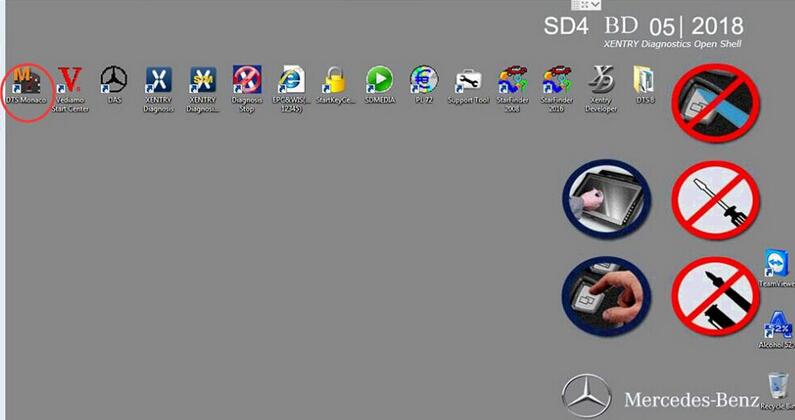
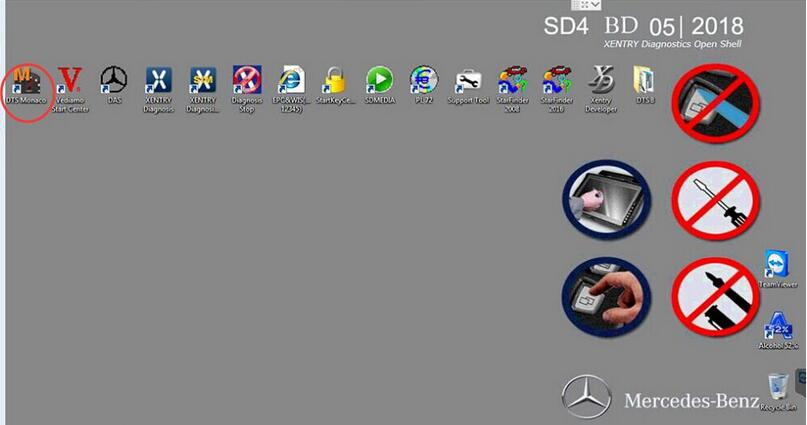
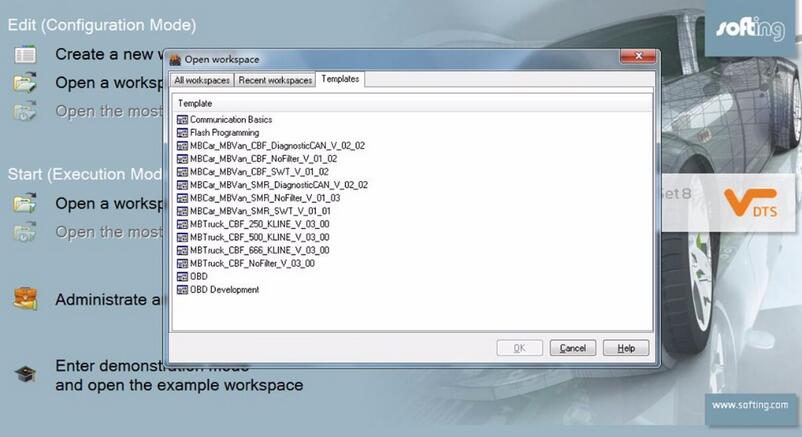
DTS Monaco is part of the Diagnostic Tool MB Star C4 Set product family and is based on the DTS Base System. Monaco stands for Modular Analyzer for Vehicle Communication. A clearly laid out start page enables simple and fast access to the functions required most frequently. The actual workspace is divided into two: one area with a fixed layout and one with layouts that you can toggle between. A status display below shows communication server messages. The various functions are realized using special, configurable interface elements. These “HMI Controls” can be arranged freely in the layouts in configuration mode and comprehensively configured.
3)Early Detection of Problems and Errors
In execution mode, a configured workspace can be “started”. In doing so individual functions can be started automatically and communication can be established in advance if so required. Self-generated test sequences enable both simple and very complex function tests. This makes it possible to detect, and remedy, communication problems and function errors at an early stage. Communication data and test results can be documented in entirety in the process.
4)Fast Results
For typical use scenarios predefined templates including an universal database for the OBD self-diagnosis as well as various protocol templates (WWH-OBD, J1939-73 among others) are supplied. In Demonstration mode, all functions can be tested, even without an interface and a license, using a detailed example including simulation. Furthermore, the tool has a completely integrated OTX runtime for running complex test sequences in accordance with ISO 13209. An authoring tool for creating such OTX sequences can be started directly from SD Connect C4 DTS Monaco.
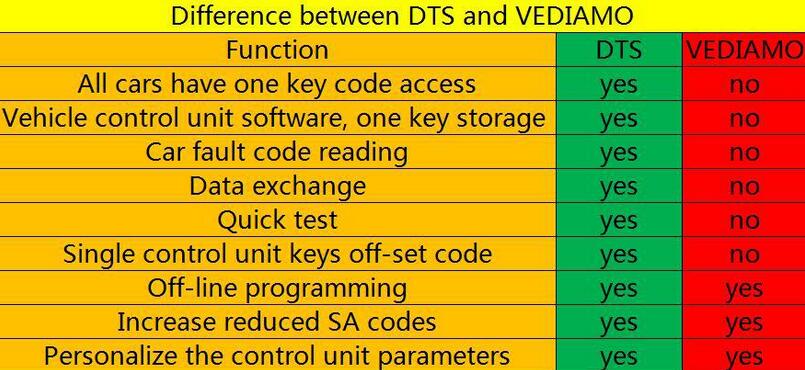
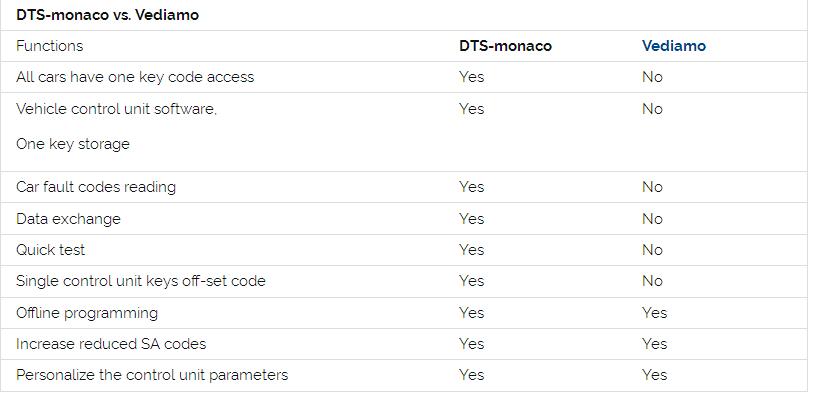
4.What’s the difference between DTS-monaco and Vediamo?
7-2
DTS-monaco vs. Vediamo
7-3
DTS-monaco wins, definitely!
5.Where to download Star Diagnostic DTS Monaco for free?
https://mega.nz/#!p9ZDGKwS!VTn9fB80Z9-YKpV8aj9PkRXR3KinAT6RFiW13GGdOHI It’s free but with unknown security.
6.Where to get DTS-monaco confirmed to work?
7-4
7-5
7-6
Here you go.
http://www.obd2tool.com/category-163-b0-MB+Star+Diagnostic+Tools.html
7.How to install DTS Monaco on Windows 7?
When installing DTS Monaco to communicates and works with SD connect c4 all user installed SDconnect Toolkit version 2.1.3. And no one tried to force the work SDconnect Toolkit version 2.1.4.2, which is installed together with the installation of Setup_Addon_DAG. And I did it.
Checked only on the system without DAS/Xentry.
DTS Monaco 8.03.12.
Windows 7 x64.
Follow the next steps:
1)  Install Monaco
2)  Install Setup_Addon_DAG
3)  Go to ะก:\ProgramData\I+ME ACTIA\Toolkit\
4)  Open and edit toolkit.ini
Code:
ShowInTray=2
NetworkIcon=2
DeviceIcon=1
ConnectionState=1
1)  Save file and reboot Windows
2)  Connect SDconnect MUX via cable
3)  Start System Configurator
4)  Go to Licenses and you will see your MUX as DCDIPartW with your serial number. After editing in Interfaces type of MUX will change to MVCI_IME_ACTIA_GmbH_SDconnect
5)  Go toInterfaces
Code:5
eCOM_SMR
Interface name – > SDconnect_SMR
Bus system interface – > D-PDU API
D-PDU API version – > I+ME ACTIA GmbHXS_D_PDU_API_FOR_DTS_8_03_12
Module type – > MVCI_IME_ACTIA_GmbH_SDconnect
Cable – > CABLE_OBDII_SDCONNECT
Physical links: CAN1, CAN4, CAN8
1)  Click Save and close System Configurator
2)  Now you can connectto the car or single ECU
8.Any good success with DTS Monaco?
DTS Monaco works good – Mercedes W205 coding
Mercedes-benz W205 coding with DTS Monaco

Friday, August 4, 2017

How to Solve MB SD Connect C4 Update Error Report?

MB SD Connect C4 has been updated to the version 2015.7, which works with MB SD Connect Compact C4 and supports the latest Mercedes Benz car and truck models. Do you succeed in update the firmware? Recently, some users has consulted the update error report. Here is the instruction and solution for sharing.
http://forobd2tool.com/wp-content/uploads/2017/08/1/2-1.jpg
http://forobd2tool.com/wp-content/uploads/2017/08/1/2-2.jpg
http://forobd2tool.com/wp-content/uploads/2017/08/1/2-3.jpg
The error report of MB STAR Connect Compact4 diagnostic tool is usually because hardware program of the host is deleted that wifi and SDC4 number cannot be setting up.
Solutions:
You can update the hardware program.
[update instruction file]
MB-SD-C4-softaware-V2015.7-Update-Error-Report-set-poorly
For unpdate, the three files above need to be upgraded.
(01_Boolimage_2_3.zip
02_CSD_2_10.zip
PmPic29_Cpld13.zip)
The update order:
02_CSD_2_10.zip> 01_Boolimage_2_3.zip> PmPic29_Cpld13.zip
NOTE: When update, please do use brand new batteries. Also, you need OBD cable to connect to your vehicle for power supply. (If you cannot succeed in connecting to the vehicle, choose OBD 12V power instead; otherwise, 622 error report would appear to tell you that the upgrade is unsuccessful.)
Benz diagnostic tool
http://forobd2tool.com/wp-content/uploads/2017/08/1/2-4.jpg
In general, this 00 error means that it is set poorly.
Here is some solution for update error report to help you update V2015.07 smoothly with New MB SD Connect C4/C5 diagnostic multiplexer.

http://cheapobd2.com/2017/07/30/how-to-solve-mb-sd-connect-c4-update-error-report/