Showing posts with label X431 Pro. Show all posts

Tuesday, September 28, 2021

How to fix X431 V Error while cleaning the DPF solution

A customer gave the following feedback on the Launch X431 V: I used the X431V for the DPF cleaning function. When the progress has reached 9% and it always shows that the connection of the diagnosis connector is abnormal or that the conditions for DPF cleaning are not correct. I've tried it on multiple vehicles and it did the same thing on all of them after this was said. It has been fully updated as stated and there have been more updates since the initial setup, but there is nothing left to update and the device still does not work.

For this problem, Obd2tool.com engineer gave the following suggestion.
Please restore your X431 V 8 inch tablet to factory settings and download the software again.

Guide to restore factory settings:
Please use this function carefully, improper operation may cause the death of X431 V, besides, after the factory settings are restored, all user data will be deleted.

Step-by-step operation:
Step 1: Make sure power supply is 100% (at least 60% power or above), and shutdown X-431 V
How-to-Solve-Launch-X431-V-Failed-to-Clean-DPF-Solution-1

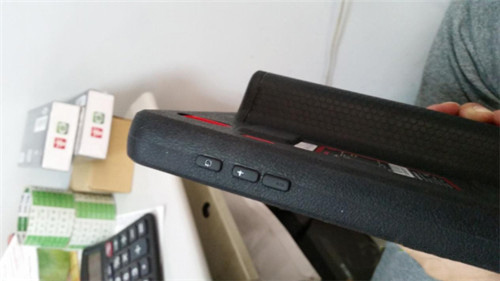
Step 2: Long press the power button and volume up button at the side of Launch X431 V, to open the machine, and then come to the menu
How-to-Solve-Launch-X431-V-Failed-to-Clean-DPF-Solution-3

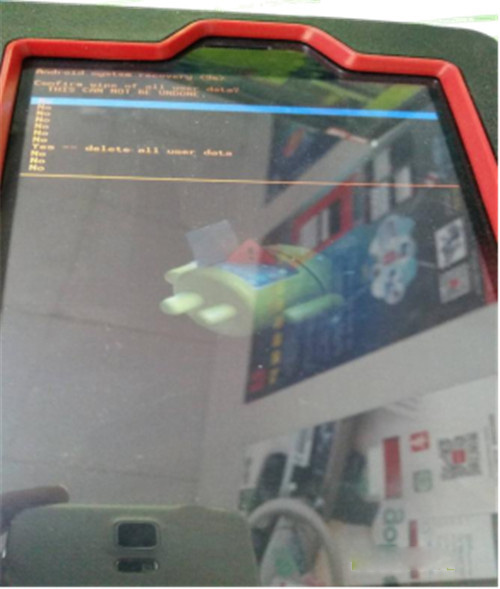
Step 3: In the menu, power button = Enter key, volume button = up and down key.
Press the volume button moves to line 5 “wipe data/factory reset”, and press the power button to confirm.
At this time, come to the next menu, press the volume button move to the line with “Yes”, press the power button to confirm
How-to-Solve-Launch-X431-V-Failed-to-Clean-DPF-Solution-2

Step 4: After this step is done, it will back to menu 1 (step 1), then move to “wipe cache partition “.
Step 5: Finally, move to “reboot system”, confirm and reboot the machine, then X431 pro is restored to factory settings.


Wednesday, July 6, 2016

Start X431 V Alternative of X431 IV

As everyone knows there have an excessive amount launch X431 Scan Tool haven't made now , this kind of as Launch x431 PAD , x431 GDS , X431 Master and so forth , but there even have some clients neet it , so we endorse our Launch x431 V to you , this scanner is the latest scanner from Start firm , and have comparable perform of PAD , its quite easy to implement and may update on the web free of charge . You are able to look at the main points as subsequent .

Start X431 V Substitute of X431 IV,X431 Diagun three and X431 Pro,Supports wifi/Bluetooth, update on the net.Supports up to sixty nine car or truck brands and whole program of automobiles.Lets to Print out facts by way of Launch wifi printer. Launch X431 V Comprehensive Technique Automotive Diagnostic Software is usually a new diagnostic scanner device launched by Start tech. Launch X431 V completely replaces X431 Pro, X431 V is usually communicated by Bluetooth and WIFI surroundings. X431 V is likewise for some 12v diesel vehicles,you'll be able to fulfil one particular click on update on the internet and entire range automobile designs. X431 V is a great tool for car analysis.

Some notes for you right here to help you cope with Porsche PIWIS PIWIS Tester II driver information is lost or you are informed no driver after first-time PIWIS computer software installation issues.

Porsche Piwis 2 is the hottest specialist tester for Porshe,quite possibly the most poweful diagnose and offline programming software for Porsche,with most recent tester for Porsche,potent capabilities,complete access .The latst software of it really is V15.six ,and will support multi-language , sucha as : Russian, English, French, Spanish, Italian, German, Portuguese, Japanese, Chinese, Dutch .