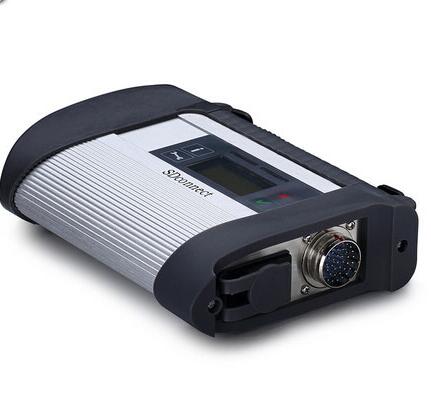
2018.12V MB SD Connect C4/C5 Star Diagnosis Plus Panasonic CF19 Laptop With Vediamo and DTS Engineering Software Support Offline Programming
Please kindly note :
1.Including Super Engineer Software:DTS monaco V8.03 And Vediamo V5.01.00 Support Offline Programming
2.Support Wireless
3.Software Version: V2018.12
HardwareVerison:OS:2.3 CSD:2.8
4.Support Multi-Language:
Deutsch, English, Franz?sisch, Italienisch, Spanien, Portugal, Finnland, D?nemark, Schweden and so on.
5.Support Both Mercedes Benz Cars and Trucks
6.Support Mercedes Benz Cars After Year 2000
Softwares list:
1. DAS 2018.12: the automatically Diagnosis Assistance System
2. Xentry 2018.12: New software released by Bennz Company after 04/2009 by diagnosis new cars.
3. WIS net 2018.09:Workshop Information System
Supply the whole view of the wiring diagram in a car, component location diagram and maintenance method. What you do is to enter the chassis number, and then you will get the manufacture data, engine configuration and the car model -all in detail.
4. EPC.net 2018.09:Electronic Parts Catalog
5. ST Finder:Part Location Finder options: 2008 and 2016
6. STARUTILITIES :the movement management system and self-test
7. SD MEDIA 2014
8. PL72: 2018 Mercedes software with PL70
9.Engineer Software:DTS monaco V8.03 And Vediamo V5.01.00 Support Offline Programming
10.HHT Software for old cars
11. Engineer version Vediamo upgraded to 5.01.00
1) Fix the error that Mercedes-Benz DAS cannot directly call WIS
2) Join the DAS sedan smart offline programming
3) Join the 204 DAS stand-alone version, which can be mutated (German), which is more powerful than Vediamo
4) Join DAS special function password-free access PKW and SMART
5) Repair SMART 450, 451, 452, 454 No longer need TAN Caculator, all offline
6) Increase offline EOL and VMAX all LKW, modify truck maximum speed limit
7) Lift the truck NOx TORGUE restriction, do not need FDOK XT calculation code, directly enter, directly cancel the legal speed limit, you can modify without special function
8) Clear the truck SCR/ADBLUE fault code (MR), do not need FDOK XN calculation code, enter directly
With the Vediamo benz engineers software out of the market, Super engineer software DTSmonaco is coming, it can achieve separate programming, scan entire vehicle software code, read entire vehicle setting code data, It truly one-button operation, Keep entire vehicle data is not a dream.
Mercedes-Benz engineer software comparison:
Vediamo: Vediamo software can only read module single data, set code, authority is too low
DTS maonaco software is development by Mercedes Benz manufacturers ,all car data one click scan and save. Data can be directly change the underlying data, the module used directly copied data replacement. Automatic programming, can automatically set code completely out of online operation. not afraid of your new models, the latest models more awesome
DTS-monacointroduction:
1.DTS-monaco is the official software used by Daimler Benz development engineers
2.DTS Monaco is universal engineering test terminal for the diagnosis and control function of the vehicle controller, The name Monaco is derived from the modular analyzer used in vehicle traffic
3.DTS Monaco covers all the tasks in the field of engineering, testing and production test preparation
4.When Mercedes-Benz maintenance test it is the greatest authority,the perfect support for C4(SDconnect) and (Ecom) Hardware(at present, Das-xentry.Vediamo lower authority)
DTS-monaco special feature:
1.Quick Test;Entire vehicle ECU quick test, and the test can choose to edit more
2.Variant Coding; Coding with variation add VO- delete VO function
3.ID identification ; One click to read the whole car and save all modules programmed numbers
4.Complete Variant Coding; One time to read all the ECU coding vehicle data, can be written to the vehicle again, completely off-line operation
5.Diagnostic Services; Advanced features can see your choice of internal and external data module, turn on the computer authorization(not driving license), Activate ECU, reset ECU, modifying the original chassis number
6.Flash programming; Fully offline programming
7.Diagnostic Trouble Code; Diagnostic module DTC fault code
8.ECU Exchange; Two of the same ECU, by reading data import data exchange
9.Symbolic trace: Record and track the file, after repeated viewing, analysis of fault logic point
Basic programming set code function:
1.unit for off-line programming
2.a key to off-set code
3.W166, cancel the programmed number of calculation method of urea, one perfect canceled all 166 urea system.
The new c s-series to the factory installed conversion:
4.222, 205 installing fragrance systems
5.2015, paragraph 212, changing traffic light permanently lit
6.212, 204, adding electric ear
7.222 205 HU5 traffic solution for DVD video
8.W164 closed recycling system
9.W205, retro atmosphere lamp
10.205, 222 adding electric ear electric trunk, the trunk kicking function
11.166, how to modify the gateway set up codes
12.166 meters finished degrees Fahrenheit to degrees Celsius
13.US standard maintenance mileage be set to the number of miles
14.164 disabled diesel particle filter regeneration system
15.166 canceled urea
16.205 added electric rear vision mirror
17.HU45 regional Chinese resolve lock
18.W204 W166 foldable rear-view mirror
19.change the 166 on board, display in Celsius
20.W212 disable ECO configurations
21.activate the HOLD function ABR2XT
22.open W22 looked up appears
23.the AMG sports package enabled W212
24.the air bag computer reset factory State W166
25.to increase the brightness of the color instrument cluster s W222
26.22.97g to install the steering wheel shift paddles
27.W221 AMG W216 dashboard style
28.airbag ECU unlock W204 212
29.disabled child seat recognition sensors W221
30.opening rear fog lamps as spare brake lights with W222
31.increasing engine power MED177