Showing posts with label BMW ICOM. Show all posts

Monday, January 25, 2021

What’s the diffence diffence between ISIS and ISTA-D?


ISIS is a BMW server platform for dealers. All updates are downloaded to the ISIS.

From there the ISIS updates ISID (diagnostics) tablets and ISSS (programming) if applicable.

The ISID runs an embedded windows xp OS.

Installed on the ISID is a program called ISTA-D (recent versions are codenamed ‘Rheingold’)

ISTA-D you can do all diagnostic functions, battery registrations etc etc. it also has wiring diagrams and guides on changing parts.

Some clever russians keep leaking the ISTA-D installer and it can easily be installed on any windows operating system. I can give you download links. They are around 10gb.

In ISTA-D you have a connection manager or how you wish to connect the computer to the odb port.

The common ones are:

ICOM
EDIABAS
OMITEC USB

ICOM is BMW official cable, its predocessor was an OPPS unit. An ICOM is more than just a cable however, it has its own network adapter, mac address, cpu, cooling etc etc. Originals are expensive but you can get cheap chinese clones for around $350 USD.

EDIABAS is a communication protocal which requires you to have BMW Standard Tools installed aswell – which isnt a bad thing! This utilises comport access amongst other connection methods and is configured by an ini file. Most people use this method of connection as its cheap, you can get a K+DCAN cable for under $50 USD now. Just do your research first as there ar bad clones about!

OMITEC is also an original USB interface. These are very rare. K+DCAN cable are copies of the OMITEC cable.

Friday, November 20, 2020

Top Tools to Register and Code BMW New Battery


BMW Battery Registration vs. Coding

The registration procedure clears the charging history of the old battery and tells your BMW that a new battery with the same specs as the old battery is installed. The Engine Control Unit (DME) can charge the battery properly.

*  Battery Registration
*  Registration must be performed every time you change the battery on a 2002 and newer BMW. It lets the car know the battery installed is brand new.
*  If the new battery has the same specs or very close to the old battery (CCA, CA, Ah, battery type) no coding will be required.
*  Battery Coding
*  In addition to the registration procedure, you will need to carry out coding if you change the battery capacity or type. Coding is required if the new battery has different specifications compared to the old battery installed in the car.
*  For example, if you install a battery with a higher or lower cranking Ampere rating, or switch between Lead Acid and an AGM battery, you will need to code (program) the DME. Otherwise, the DME may overcharge or undercharge the new battery, and therefore shorten the life of the battery.

Some FAQs:

Q: Why do I need to register a new battery?
A: The short answer is that BMW designed the charging system with an algorithm that varies the rate of charge by the age and type of the battery installed. Registering a new battery resets the algorithm back to optimal charging voltage for the specified battery.

The long answer: “The negative battery cable has an electronic control unit on the battery end of it called an intelligent battery sensor (IBS). The IBS measures the state of battery charge and sends this information to the ECU. The ECU uses this information to control how much charging voltage is needed from the alternator to support vehicle electricity needs. A battery deteriorates normally over time and depending upon service demands and driving profile. The IBS reads this and the ECU tells the charging system to increase voltage and amperage output incrementally as the battery matures. Therefore, at battery replacement time, if you don’t tell the ECU it has a new battery it will overcharge the new battery causing it to wear out faster.

The registration process takes place in the ECU, which is the main player in this system. Also, when the IBS sees that battery voltage is too low for normal vehicle operation it can start shutting down vehicle functions to conserve power while keeping the vehicle operational. This would be accompanied by a check control warning of excessive battery discharge.”

Q: Why do I need to “code” for a new battery?
A: The answer to this varies. You may not have to! That is, so long as you replace your old battery with an exact replacement. However, if you switch from a wet-cell type battery to an AGM type battery, or vice versa, you must code for the change.

AGM and wet-cell batteries require a different rate of charge output from the alternator. Moving between these two types without coding can lead to over-charging or under-charging.
Also, batteries have a discharge rating called amp hours (ah). You must specify to the DME what the “ah” rating of your battery is so the car can run the proper charging algorithm.

Top BMW Battery Registration Scan Tools:

To complete the BMW battery registration process yourself, you will first need an OBD2 scanner that can perform BMW battery registration. Here is a list of popular scanners that you can use to register a new BMW battery.

*  Foxwell NT510/NT520/NT530 for BMW
*  One of the most popular BMW scanners. The tool can be used to register a new BMW battery with similar specs compared to the previous battery. Installing a new battery with significantly different specs requires coding which is not currently available on Foxwell NT510 at the time of testing.
*  BMW ISTA Rheingold
*  Require a laptop, ISTA software and hardware interface (ICOM, K+DCAN, ENET cable etc).
*  Autel Scanners (MaxiSys, TS608, MD808 Pro etc)
*  Professional Level Diagnostic Scanner. It can be used to program and code any type of battery including AGM and lead-acid, even if the replacement battery is significantly different than the original.
*  BMW INPA Software (INPA K+CAN)
*  Require a laptop and familiarity with INAP software. One of the cheapest scan tools able to register a BMW battery.
*  Carly App for BMW

The procedure to register a BMW battery is very similar to most of the scanners out on the market.

Monday, May 4, 2020

Possible to use Older ISTA-D with new DB2.40

Is it possible to use an Older ISTA-D for example 4.15 with an newer DB 4.20 ?
its possible, you have to make a new key in registry:
[HKEY_LOCAL_MACHINE\SOFTWARE\WOW6432Node\BMWGroup\ISPI\Rheingold]
“BMW.Rheingold.Database.CheckAppVersion.Enabled”=”False”
and change product version in registry from your installed new standalone ICOM A2 ista:
[HKEY_LOCAL_MACHINE\SOFTWARE\WOW6432Node\BMWGroup\ISPI\ISTA]
“ProductVersion”=”4.15.16.17369″
loading..

Wednesday, August 28, 2019

How to set WIFI for BMW ICOM NEXT A+B+C New Generation OF ICOM A2

1.Set router
username:ISAP
password:12345678
2.Connect the laptop with router
3.The device is powered on and waits for the WLAN light to be on for a long time.

If the customer needs to set the WIFI account password of BMW ICOM NEXT A+B+C.Power on the device and connect to the computer via a network cable
1.Open IToolRadarsoftware
图片2
2.Record the current IP address of the device
图片3
3.Open IE browser and enter the IP address you just recorded.
+  :58000图片4
4.Enter WLAN Settings.Put username in SSID,put the password in Pre-shared Key
图片5
5.Click Save Changes
6.Then restart the device and you can use it

Sunday, February 3, 2019

BMW Ista-D Ista-P Windows 7810 Download + How to install

Confirmed! BMW ISTA-D/P works in windows 7, 8 (8.1), 10 without problem.
Look here: BMW ICOM ista software download with Windows 7, Window 8, Windows 10 installation tutorials (updated in 01-2019)
Part 1: BMW ista-p ista d download
Part 2: ista p ista d install (Windows 7/8.1/10)
Part 3: BMW icom cable for ista
In detail…
Part 1: BMW ista-d ista-p download
Free version:
Rheingold 4.14.14 Standalone / SDP 4.14.12 / ISTA-P 3.65.2.000 (SQLiteDBs EN,DE,RU,OTHER)
https://mega.nz/#!BaBkBawb!_buiiV3KAJ70_ds8mTEL_PBdsRKv3HiKoImaGo4hnQ0
Newest BMW Rheingold ISTA-D 4.12.12 ISTA-P 3.65.0.500 Download
Tested version:
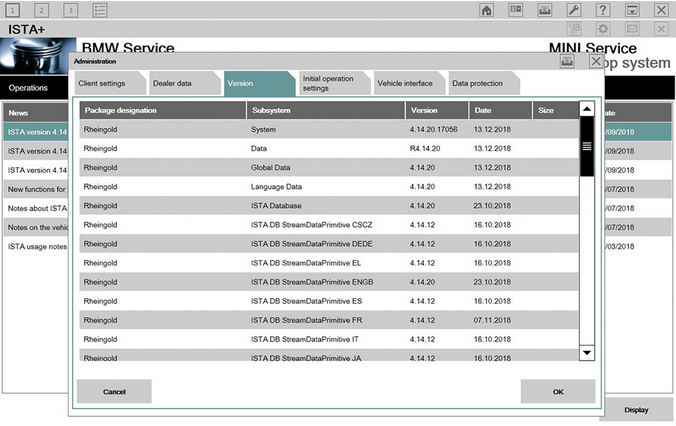
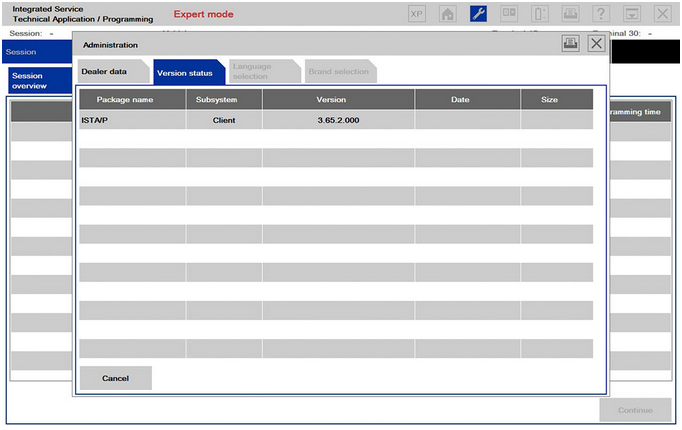
ISTA-D 4.14.20 ISTA-P 3.65.2.000:
Have tested on Windows 7 successfully
Work no issues with BMW ICOM cables such as ICOM A2, ICOM Next, etc.
Confirmed to work perfectly on BMW E/F series
100% no problem in vehicle diagnostics, coding and programming
BMW-Ista-D-Ista-P-1 BMW-Ista-D-Ista-P-2 BMW-Ista-D-Ista-P-3
Part 2: ista d ista p Win 7 Win 8 Win 10 install
BMW ista-d ista-p Windows 7 install:
Step 1: ISTA-D Diagnosis software
Open software
Double click RHEINGOLD icon to change Full Screen
Go to Operations, then Read Out Vehicle Data, press Complete identification
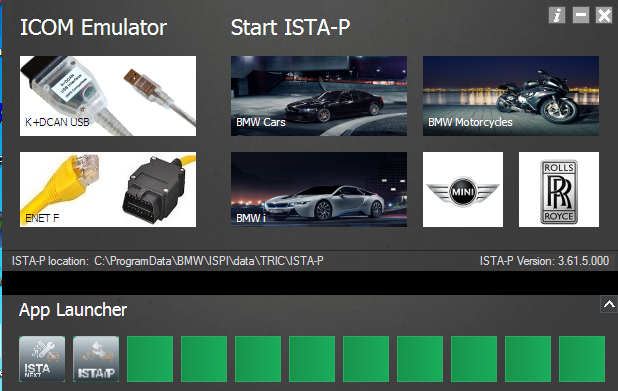
Follow ISTA prompt to connect the ICOM emulator with vehicle
When it shows ICOM, you can click lower right corner Connect to start diagnosis. (If the Status shows firmware, you see update ICOM firmware first, see instruction in Part 5)
Step 2: ISTA-P Programming software
Open ISTA-P software
Click “Reset Settings” tab then close
Open it again
Select ISTA-P language and Resolution
Check the resolution on desktop, it is the same as ISTA-P resolution you just chose.
Select vehicle type, BMW, MINI, BMW Motorcycle or Rolls Royce
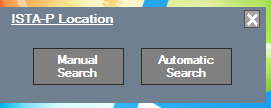
Select ISTA-P server automatically
Step 3: ETK
Open ETK software
Click “Extras” tab>> “Settings” to change language and other settings
KSD
Click “Settings” to change language and others
Step 4: Engineer Tools
Engineering & programming software INPA, NCS-Expert, WInKFP etc
Before using the engineer tools, must set/configure ICOM settings
1) Open Engineer Tools, Itool Radar, select first line option, click “Reserve” button on the right
ICOM Device status will be changed to Reserved.
2) Open EasyConnect, do following settings. The IP address must be set to correct 169.254.92.38, click “CHECK” button
Configuration is done. Start using engineering software (INPA, WinKFP, etc.)
BMW ista Windows 8.1 install:
Easy to do:
install Vredist 2013 and 2015, net framework 4.6.1 or 4.6.2
Install admin client and launcher
put license files in right location
Install all ISTA/P Files
Put all correct files in sharedstorage and install all.
Install standard tools , install patches
Use hardlink for PZData
BMW ista Windows 10 install:
Setup on Windows 10 64-bit:
After the Windows 10 update (which failed the first two attempts because it turned out the BIOS needed an update first) most applications were fine.
By simply revisiting the COM port settings for my K + DCAN USB to set back to COM9 , minimum buffer sizes and minimum latency Rheingold ran perfectly.
Loader V3.2 and ISTA-P was a bit more tricky. I re-ran the Network Config Tool. I tried Loader V4.3. No joy. However I did it nicely and ISTA-P runs nicely too, and with the excellent Loader V4.3 .
The Windows Networking and Networking Toolkit for Networking and Networking.
—> The setting was to go into Network Settings , select the USB Loopback which has been renamed ” Ethernet 2 ” and rename it to “USB” then go into its settings just like you would ENET lead and set the IPV4 IP to 169.254.0.8 with a mask of 255.255.0.0
Tip: ista p install help
Question: Where (what path) do you place the SDP contents to support flashing from ISTA?  Also, where do you place the BLP contents as well?
Answer: Put the two folders data and data_swi in C:\Rheingold\PSdZ
And registry:
x86
[HKEY_LOCAL_MACHINE\SOFTWARE\BMWGroup\ISPI\Rheingold]
“BMW.Rheingold.Programming.ExpertMode”=”true”
“BMW.Rheingold.Programming.Enabled”=”true”
“BMW.Rheingold.Programming.PsdzDataPath”=”C:\Rheingold\PSdZ\data_swi”
x64
[HKEY_LOCAL_MACHINE\SOFTWARE\Wow6432Node\BMWGroup\ISPI\Rheingold]
“BMW.Rheingold.Programming.ExpertMode”=”true”
“BMW.Rheingold.Programming.Enabled”=”true”
“BMW.Rheingold.Programming.PsdzDataPath”=”C:\Rheingold\PSdZ\data_swi”
Good to know:
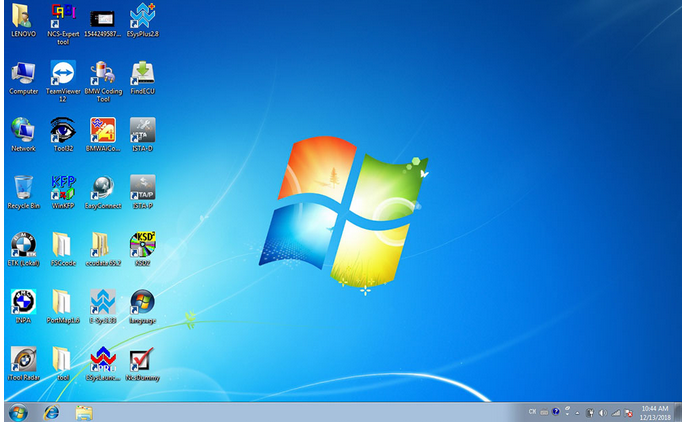
There are many programs for BMW ICOM full packages:
ISTA-P 3.65.2.000
ISTA-D 4.14.20
SDP programming database 4.14.20
VIN 11.06.2018
ETK 11.2018
KSD 11.2018
INPA 5.00
WINKFP 5.2.3
NCS Expert 4.0
BMWAi 4.6 for hidden functions flash
E-SYS 3.30,ESYS3.33 ,ESYSPlus2.8
ESYSPRO2.8
DR.GINI B020
FSC Navigator Calculation Software
This is for your information.
You should be equipped with laptop knowledge and rich in software installation if you want to install BMW icom software yourself.
If you have a decent laptop,
real professional will help you to install all BMW software in the disk before delivery.
If you don’t have a good laptop to work on,
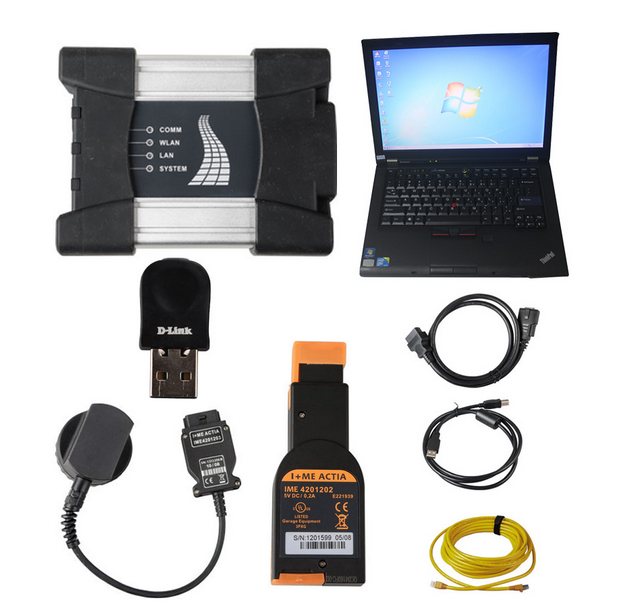
a second-hand but functional Lenovo T410 can be your way to go.
If you’re new to BMW diagnostics and programming but have nothing,
you can get a full BMW diagnostic and programming kit, incl. icom next, ista and engineering software, laptop with all sw installed. (it will help you save a lot)
BMW-ICOM-NEXT
Part 3: BMW icom cable for ista
BMW-icom-cable-for-ista
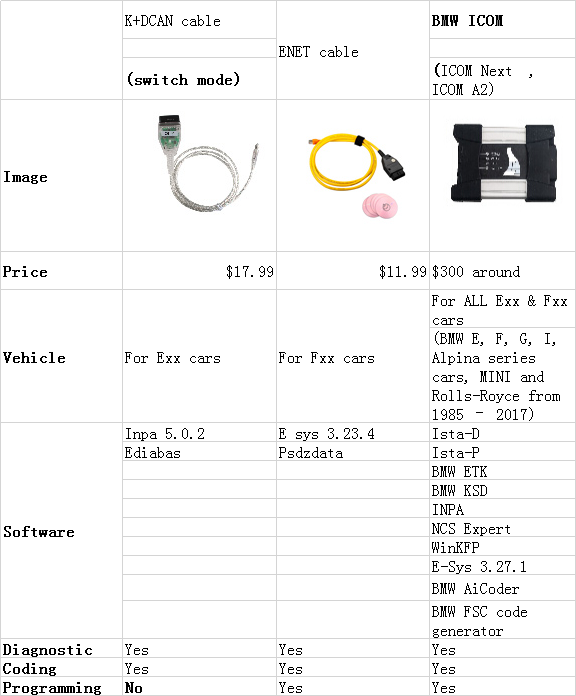
This part is for those who are looking for a decent bmw icom cable: K+DCAN or ENET or ICOM A2/ ICOM Next
In summary,
It depends on your purpose (diagnostic or coding or programming) and model (Exx or Fxx or others).
For Coding, you need different Tools, NCS Expert / SP-Daten for E-Series and E-Sys / PSdZData for F-Series.
All Diagnosis and Coding can be done with cheap DCAN Cable for E-Series and cheap ENET Cable for F-Series.
For Programming (Flashing ECU’s with new Firmware), then you need ISTA/P for for both E-Series and F-Series cars, or you can use WinKFP for E-Series and E-Sys for F-Series. For E-Series Programming, you will need an ICOM, but for F-Series Programming, you can use ENET Cable.
For Exx- Series:
Interface = K+DCAN Cable (OBDII to USB) or ICOM
ECU Data Files = SP-Daten
NCS Expert = Coding Software
WinKFP = Programming (Flashing) Software
EDIABAS = Low-Level ECU Communication Software used by NCS Expert & WinKFP
For Fxx- / Ixx- / Gxx-Series, Mini, & Rolls-Royce:
Interface = ENET Cable (OBDII to RJ45 Ethernet) or ICOM
ECU Data Files = PSdZData
E-Sys = Coding Software
E-Sys = Programming (Flashing) Software
About: BMW ICOM
ICOM A (also ICOM A2, ICOM A3, ICOM Next A): main interface
ICOM B: adapter for programming multimedia in E series
ICOM C: adapter for old BMW with round 20 pin diagnostic plug
ICOM D: adapter for motorcycles
ISTA+ (AKA Rheingold or ISTA-D)
DIAGNOSTICS for All Vehicles
PROGRAMMING for F/I/G/RR & MINI, but requires an ICOM
ISTA-P
PROGRAMMING traditionally for all chassis, but is being phased out by August 2017, except for legacy E-series.
Replacement ECU’s must be NEW
YOU HAVE TO KNOW before you buy ICOM A2 or ICOM A3 or ICOM Next:
ICOM A vs ICOM A2 vs ICOM A3
Modified ICOM A2 for vehicles with OBD access receives a significantly more powerful processor and more storage capacity. And robust aluminium case will help to avoid damage when using in harsh environments. It works better in cooling, runs faster and works more stable, not easier broken than older ICOM A.
ICOM A3 can program all units for all BMW series expect media system, and work more stable and has stronger compatibility than ICOM A2, A1.
ICOM NEXT vs the old ICOM
-> much faster in BMW F and G series ..
-> supports gigabit Ethernet too to be future proof, there currently is not gigabit Ethernet protocol defined yet for autos. Also it has USB3.0 instead of USB2.0 and a better wifi card.
ICOM A3 vs ICOM Next
Reply 1: Both of these have the same hardware. None of them are clones of anything also. A3 is fully china version of ICOM, there is no original version looking like this crap. NEXT is just looking as genuine NEXT, but with old A1/A2 hardware inside, like A3.
Reply 2: I recommend buying an original Icom next. It is priced roughly at 500 euro. Take in consideration that you will probably work on cars that are worth 30-40k euro or maybe more and if your chinese icom fails you even once, you will be spending a lot of money on a bricked ecu.
Reply 3: You can have a Icom Next HQ clone if you don’t have much budget of it. This tool handles multiprogramming and coding quite nicely, much faster in BMW F and G series and if flashing the complete vehicle. It supports gigabit Ethernet too to be future proof, there currently is not gigabit Ethernet protocol defined yet for autos. will be compatibility for future cars. Also, it has a better wifi card and USB3.0 instead of USB2.0 (USB 3.0 is theoretically more than ten times faster than USB 2.0. We need usb 2.0 or usb 3.0 flash drive formatted with FAT32.)
ICOM NEXT A vs ICOM A2
ICOM Next wins in price!!!
2019 ICOM Next A+B+C price: 359.00 usd
ICOM A2+B+C price: 519.00 usd
ICOM Next A wins in performance!!
->handles multiprogramming and coding quite nicely
BMW ICOM Next wins in speed!!
->faster startup and standard wifi
->much faster in BMW F and G series ..
->much faster if flashing the complete vehicle
(Flashing of NBT is not faster with icom next its same like icom A and A2)
Next wins in future cars!
->will be compatibility for future cars
-> supports gigabit Ethernet too to be future proof, there currently is not gigabit Ethernet protocol defined yet for autos.
ICOM Next wins in connection!
-> has a better wifi card
->has USB3.0 instead of USB2.0
note: USB 3.0 vs. USB 2.0
The USB 2.0 standard offers a theoretical maximum signaling rate of 480 megabits per second, while USB 3.0 defines a maximum rate of 5 gigabits per second. In other words, USB 3.0 is theoretically more than ten times faster than USB 2.0
We need usb 2.0 or usb 3.0 flash drive formatted with FAT32.
ICOM Next wins in PCB design!

Friday, November 30, 2018

BMW ICOM A2+B+C for BMW with 2018.9V Software program Plus EVG7 Diagnostic Tool FAQ

BMW-ICOM-A2
Query:
Can BMW ICOM A2+B+C software be updated if yes how so? And does this tablet run ista/d and ista/p can it program and code modules
Answer:
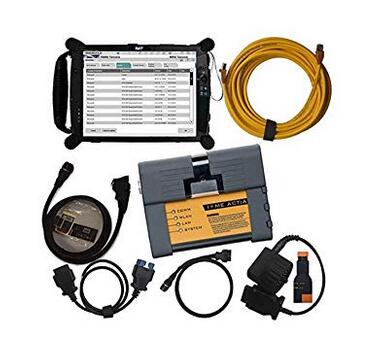
Hello my friend: the software could be updated, but you might want to obtain a new application HDD from us! You simply need to buy one particular time for one particular year, the software program is about USD 135 with shipping cost, it truly is one 500GB HDD, and this can be a specialist tester for BMW, so it could plan!
The update each year obtainable at our shop. Tablet run windows, so very same as typical laptop hardware.
Question:
Are you able to send me all the information and facts around the bmw laptop or computer is it just like ista when programing
Answer:
It may test and programmer,we have set up all software inside the EVG7, as well as active it properly, you'll be able to use it straight if you get it!
Query:
Is this wireless? Is every little thing already loaded onto the evg7? Thinking of purchasing BMW ICOM or a single with all the laptop which will be superior? Thanks
Answer:
hello my pal:
I hope you might have a very good day! we'll set up almost everything for you personally nicely just before we send it to you, you may choose the products as outlined by your need, if you can install the application by oneself, you can acquire it devoid of computer, just with one protable challenging disk with it, so you could use it with any laptop, for those who think install the software program is actually a dilemma, so you can pick the one together with the EVG7, we'll set up computer software for you, it can be ok?

Sunday, November 12, 2017

(Solved) ISTA-P folder not exist, improper PC shutdown

I have solved an ISTA-P problem that happen in case of improper shutdown of windows 7 32bit, ISTA–P version 3.61.5.000.
With help of users > darckreign1984 and AutoExe3219 I was able to discover following. 8 hours of labor.
If you see a screen, that BMW ICOM ISTA-P folder does not exist anymore, just check if there is a folder named Dataprocurement in following two directories :
istap-fail
C:\ProgramData\BMW\ISPI\data\TRIC\ISTA-P\BMW
C:\ProgramData\BMW\ISPI\data\TRIC\ISTA-P\Taurus
If there is no such directories, you must copy them from another location in the PC. The location is :
C:\Users\Administrator\AppData\Roaming\BMW Group\BMW ISTA-P Loader V6.1F\6.1.1.0\dataprocurement
There ate the two separate directories that simply have to be copied to the directories listed above. Then just start the loader and fill up the form with a data that you want. Then, from the loader page choose BMW cars and you are good to go.
Loader_Success
Remember. Never try to shut down the PC before the loader is completelu shut down.
Make a backup of the critical locations to be able to make a restore in case of such accident.

http://cheapobd2.com/2017/11/05/solved-ista-p-folder-not-exist-improper-pc-shutdown/