Is it possible to use an Older ISTA-D for example 4.15 with an newer DB 4.20 ?
its possible, you have to make a new key in registry:
[HKEY_LOCAL_MACHINE\SOFTWARE\WOW6432Node\BMWGroup\ISPI\Rheingold]
“BMW.Rheingold.Database.CheckAppVersion.Enabled”=”False”
and change product version in registry from your installed new standalone ICOM A2 ista:
[HKEY_LOCAL_MACHINE\SOFTWARE\WOW6432Node\BMWGroup\ISPI\ISTA]
“ProductVersion”=”4.15.16.17369″
loading..
Showing posts with label BMW ICOM Software. Show all posts
Showing posts with label BMW ICOM Software. Show all posts
Monday, May 4, 2020

Friday, November 30, 2018
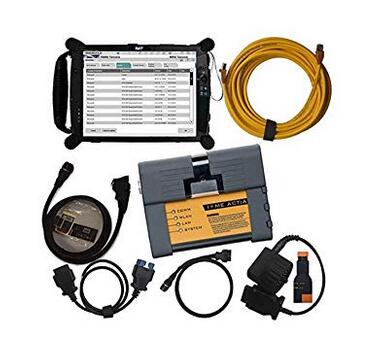
BMW ICOM A2+B+C for BMW with 2018.9V Software program Plus EVG7 Diagnostic Tool FAQ
Query:
Can BMW ICOM A2+B+C software be updated if yes how so? And does this tablet run ista/d and ista/p can it program and code modules
Answer:
Hello my friend: the software could be updated, but you might want to obtain a new application HDD from us! You simply need to buy one particular time for one particular year, the software program is about USD 135 with shipping cost, it truly is one 500GB HDD, and this can be a specialist tester for BMW, so it could plan!
The update each year obtainable at our shop. Tablet run windows, so very same as typical laptop hardware.
Question:
Are you able to send me all the information and facts around the bmw laptop or computer is it just like ista when programing
Answer:
It may test and programmer,we have set up all software inside the EVG7, as well as active it properly, you'll be able to use it straight if you get it!
Query:
Is this wireless? Is every little thing already loaded onto the evg7? Thinking of purchasing BMW ICOM or a single with all the laptop which will be superior? Thanks
Answer:
hello my pal:
I hope you might have a very good day! we'll set up almost everything for you personally nicely just before we send it to you, you may choose the products as outlined by your need, if you can install the application by oneself, you can acquire it devoid of computer, just with one protable challenging disk with it, so you could use it with any laptop, for those who think install the software program is actually a dilemma, so you can pick the one together with the EVG7, we'll set up computer software for you, it can be ok?
Sunday, November 12, 2017
(Solved) ISTA-P folder not exist, improper PC shutdown
I have solved an ISTA-P problem that happen in case of improper shutdown of windows 7 32bit, ISTA–P version 3.61.5.000.
With help of users > darckreign1984 and AutoExe3219 I was able to discover following. 8 hours of labor.
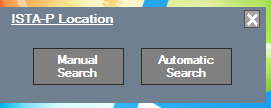
If you see a screen, that BMW ICOM ISTA-P folder does not exist anymore, just check if there is a folder named Dataprocurement in following two directories :

C:\ProgramData\BMW\ISPI\data\TRIC\ISTA-P\BMW
C:\ProgramData\BMW\ISPI\data\TRIC\ISTA-P\Taurus
If there is no such directories, you must copy them from another location in the PC. The location is :
C:\Users\Administrator\AppData\Roaming\BMW Group\BMW ISTA-P Loader V6.1F\6.1.1.0\dataprocurement
There ate the two separate directories that simply have to be copied to the directories listed above. Then just start the loader and fill up the form with a data that you want. Then, from the loader page choose BMW cars and you are good to go.

Remember. Never try to shut down the PC before the loader is completelu shut down.
Make a backup of the critical locations to be able to make a restore in case of such accident.
http://cheapobd2.com/2017/11/05/solved-ista-p-folder-not-exist-improper-pc-shutdown/
With help of users > darckreign1984 and AutoExe3219 I was able to discover following. 8 hours of labor.
If you see a screen, that BMW ICOM ISTA-P folder does not exist anymore, just check if there is a folder named Dataprocurement in following two directories :
C:\ProgramData\BMW\ISPI\data\TRIC\ISTA-P\BMW
C:\ProgramData\BMW\ISPI\data\TRIC\ISTA-P\Taurus
If there is no such directories, you must copy them from another location in the PC. The location is :
C:\Users\Administrator\AppData\Roaming\BMW Group\BMW ISTA-P Loader V6.1F\6.1.1.0\dataprocurement
There ate the two separate directories that simply have to be copied to the directories listed above. Then just start the loader and fill up the form with a data that you want. Then, from the loader page choose BMW cars and you are good to go.
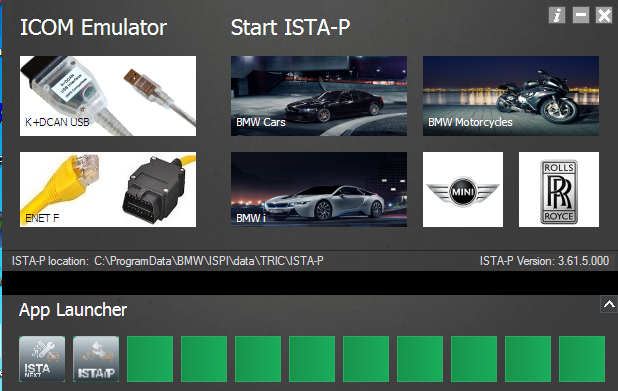
Remember. Never try to shut down the PC before the loader is completelu shut down.
Make a backup of the critical locations to be able to make a restore in case of such accident.
http://cheapobd2.com/2017/11/05/solved-ista-p-folder-not-exist-improper-pc-shutdown/
Subscribe to:
Posts (Atom)