If you have purchased the Ford VCM 2,
then you need to purchase the one-year software Ford license as well
(provided it was not already included in your current package). The
great thing about buying the Ford diagnostic software license is that
you don’t have to wait for anything to be shipped. You will receive the
license key in your email within minutes of purchase, and tech support
is available to help you with the license installation.
1 Year Activation License Emailed Upon Purchase
Full Access Dealer License
The license is necessary to operate the software and must be renewed
at regular intervals in order to ensure that all operations are up to
date. Purchasing the license through our website ensures that you have
an active license code and that you can keep your equipment and business
running smoothly.
You can use the Ford IDS software without purchasing a license.
Unfortunately, vehicle communications will not work unless you have an
active, currently updated Ford IDS subscription. Trying to use the VCM
IDS without a software license is like trying to operate a car with no
fuel. You might be able to listen to the radio, but you won’t be going
anywhere.
If you need the Integrated Diagnostics Software (IDS), then you also
need the Ford VCM II. This particular package comes with tech support
included so you can troubleshoot the program if you happen to run into a
snag. Tech support is invaluable, especially if you are not accustomed
to working with this particular piece of equipment. They can help you
get set up and ready to work and answer any questions you might have
before getting started. They are also available to answer questions
about any issues you might encounter while learning to run the IDS scan
tool and will troubleshoot issues with the hardware.
The Ford VCM 2 and Ford IDS tool combined will provide you with all
of the necessary diagnostic capabilities to pinpoint issues in nearly
any 16 pin Ford and all 2013 and newer Ford vehicles. The wireless
feature uses USB connectors and adds an extra layer of convenience for
your technician to work remotely while the VCM Ford is hooked up to the
vehicle. As long as you have a laptop with the proper capabilities, you
will be ready to run diagnostics on your Ford vehicle in no time while
allowing your technician to work from the office using the Ford IDS tool
when necessary.
The VCM II for Ford/Mazda 2 in 1
is made to be durable and stand up to the abuse it might encounter in
most garages using shock-resistant edges. You won’t have to worry about
drops and bumps ruining your valuable equipment and can continue to work
even if you hit a minor snag. It also acts as a CFR (Customer Flight
Recorder) when using the optional connector and supports VMM (Vehicle
Measurement Module).
Don’t short change your repairmen and technicians with outdated
diagnostic equipment. Your employees and customers deserve to work with
the best. The Ford IDS VCM 2 is a must have for any repair shop that
works with 2013 Fords and newer on a regular basis. Its performance
lives up to the high standards set by Ford in order to properly maintain
their vehicles.
Thursday, January 2, 2020

Sunday, December 22, 2019
GM TECH2
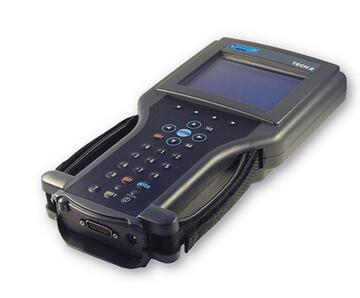
The Tech 2 is a powerful, versatile hand-held diagnostic computer, designed to help diagnose and repair today’s automotive electronic systems. The Tech 2 Scanner supports the changes in the on-board electronic systems for model years 1996 and beyond. With the addition of the CAN Diagnostic Interface (CANdi) module, Tech 2 will support GM on-board electronic systems for years to come.
The CANdi is an in-cable module that works with existing Tech 2 components including the VCI, cables and adapters to add CAN diagnostic capability to the Tech 2 tester. The CANdi module is fully backward compatible with current Tech 2 functionality and operates transparently when diagnosing non-CAN-equipped vehicles.
The Tech 2 provides extensive diagnostic capability through the 32MB PCMCIA card. The PCMCIA card stores diagnostic information intended to diagnose powertrain, body or chassis control modules and related vehicle malfunctions. It also contains the Service Programming System (SPS) application which allows the Tech 2 to program control modules with vehicle calibration data.
The PCMCIA card is updated by linking the Tech 2 to a PC that has access to the ACDelco TDS website. This method of communication provides flexibility for updating the card with vehicle calibration data, mid-year and new-model-year vehicle diagnostics and Tech 2 software enhancements. Software updates are distributed to GM dealers automatically via TIS2WEB at the GM Global Connect web site or go directly to the TIS2WEB site to download updates at any time.
The Tech 2 is capable of capturing a snapshot of vital performance data at idle or during a test drive. You can replay the snapshot or plot and graph the data directly on the Tech 2, or the snapshot file may be uploaded to an approved GM Techline terminal. The file may also be stored on the CD-ROM terminal for future reference. The snapshot capability allows you to see where an intermittent fault occurred, even if it did not set a trouble code.
Model Year Coverage
92 up OBD systems CAN equipped vehicle coverage with CANdi module
PC Requirements:
Only required if reprogramming or Tech 2 diagnostic software update is performed. Tech 2 is a stand-alone diagnostic tool. Currently GM is recommending a minimum Intel i5 processor
Recommended package:
Intel Core i5 at 2.6GHz 64 bit
2) USB 2.0 (or better) ports
500GB Hard drive
4GB ram
Windows 7 Professional 64bit
Internet Explorer 9 +
Wireless capability
Note: The Tech 2 uses a legacy DB9 Serial Null modem cable to connect to PC. Current spec PC do not have this connection. It will be necessary to have the null modem cable and a Tripplite Serial to USB adapter properly configured on the machine to perform reprogramming or diagnostic software updates.
Software License
Available as three different subscriptions:
Complete GM Service Support Package Includes: GM SI, Tis2Web – All Access, GDS 2, and Tech2Win
Tech 2 Service and programming package which includes software updates and license for the Tech 2 operating software, Service programming software, Tech 2 View, Tech 2 Snap Shot, and Tech2Win
Tech 2 Diagnostics Includes: Tech 2 Diagnostic software updates
The Tech 2 does not time out if the software becomes outdated. The tool will display a message to update as a reminder and may not operate correctly with newer vehicles if it is not updated regularly.
DTC Code Retrieval
Retrieve OE DTC with code Definition X X
Retrieve and display Mode 6 Data X
Link DTC to service information X
Customizable PID display X
Data Logging
Body X X
Chassis X X
Electrical X X
Powertrain X X
Network Test
CAN X X
J1850 X X
Module Programming
Programmable Module replacement procedures X Set-up
Module Reprogramming (Reflash) X SPS
Coding X X
Supplemental restraints initialization X X
Programmable Parameters ( ability to change in service settings ie, tire size, personality, customer convenience etc. X X
Body Controls
Anti-theft System Functions X X
Remote Keyless Entry X X
Restraints (supplemental restraints and seat belts) X X
Chassis Tools
ABS Service Bleed X X
ABS/ Brake system functions X X
IVD Initialization Sequence (SAS reset) X X
Ride Height Calibration ( for vehicles with pneumatic or hydraulic ride height controls) X
Cruise Control System tests X X
Electronic Ride control X X
Electrical Tools
Charging System Test X X
Audio X X
Powertrain Tools
EVAP Test X X
Force monitors to run X X
Fuel System Test/Relative Injector Flow Test X X
Bi-directional control of fuel components X X
Bi-directional Ignition System control X
Power Balance Test X X
Transmission bi-directional Tests X X
Engine Checks and OBD Tests (Drive Cycle, Mode 01, Mode 06 & Mode 09)
EGR Test X X
Other Powertrain tests & functions X
Digital Multimeter
Basic DMM functions (Volts, resistance, frequency) X
Current measurements (50 Amps/500 Amps) X
Pressure/Vacuum measurements with PVT X
Oscilloscope Tools
Oscilloscope X
Alternator ripple X
COP (Coil-On-Plug) stress test X
Signal Generator Monitor (SGM) X X
Monday, December 16, 2019
Fiat V31.09 Odometer Adjustment Upgrade on OBDSTAR X300 DP and X300 DP Plus
Fiat V31.09 Odometer Adjustment Upgrade on OBDSTAR X300 DP and X300 DP Plus

www.obd2tool.com
sales@obd2tool.com
What’s App:+86 18003909206

www.obd2tool.com
sales@obd2tool.com
What’s App:+86 18003909206
Thursday, December 5, 2019
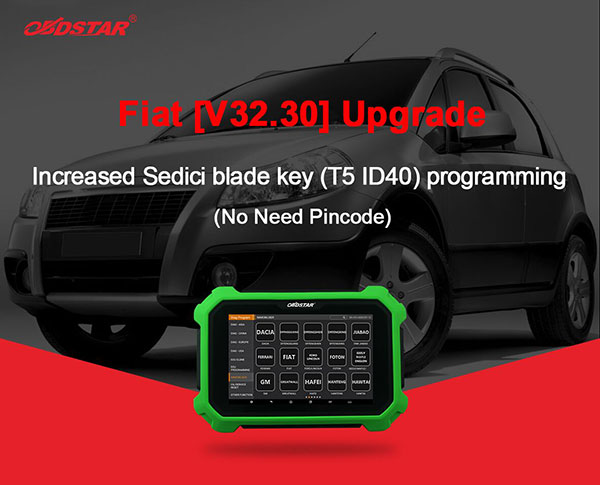
Fiat V32.30 IMMO Upgrade on OBDSTAR X300 DP Plus and X300 PRO4 and X300 DP
Fiat V32.30 IMMO Upgrade on OBDSTAR X300 DP Plus and X300 Pro 4 and X300 DP

www.obd2tool.com
sales@obd2tool.com
www.obd2tool.com
sales@obd2tool.com
Tuesday, December 3, 2019
Why choose Mercedes C5
First , see the fake Mercedes Benz C5: nothing update
Fake mb star c5 is another SDconnect c4 with a different look only
fake C5 adopts the same design in appearance as the genuine from French ACTIA Company
same sw, some PCB, same result
See the fake board from c5 mux, completely same as Mercedes BENZ C5
To buy a fake c5 is to have a c4 in hand.
But now, you have luck with a real Mercedes Benz C5.
Genuine Xentry Connect C5
1:1 clone of the original
This 1:1 clone of the original is the newest star diagnosis system in the year 2017.
Same as the one produced by French ACTIA Company, can test Engine /Transmission / air conditioning /SRS.ABS/ anti-theft system and OBD-II system.
New & Update:
1 This C5 is the real version with HQ PCB like the original, not the cheap onemade by SD connect PCB.
2 support the newest hybrid W222.
3 has an Ethernet switch, which switches the TCP/IP messages in the event of DoIP diagnosis to the vehicle side.
New PCB talks.
Top 7 Reasons To Get MB SD Connect C5:
1.Support Wireless
2.Software Version: 2019.09
3. Hardware Verison: OS:2.3 CSD:2.11
4. Support Multi-languages: English, Croatian, Czech, Danish, Dutch, Finish, French, German, Greek, Hungarian, Italian, Japanese, Korean, Polish, Portuguese, Romanian, Russian, Spanish, Swedish, Turkish & Chinese
5. Support Mercedes Benz Cars After Year 2000
6. The quality is the best and it can work stable.
7. Support Offline and Online Programming, If You Want to Do Online,you must have an account online.Buy This Online SCN Coding Service(RD94)
Softwares list:
1. DAS 2019.09: the automatically Diagnosis Assistance System
2. Xentry 2019.09: New software released by Bennz Company after 04/2009 by diagnosis new cars.
3. WIS net 2019.03:Workshop Information System
Supply the whole view of the wiring diagram in a car, component location diagram and maintenance method. What you do is to enter the chassis number, and then you will get the manufacture data, engine configuration and the car model -all in detail.
4. EPC.net 2018.11:Electronic Parts Catalog
5. ST Finder:Part Location Finder options: 2008 and 2016
6. STARUTILITIES :the movement management system and self-test
7. SD MEDIA 2014
8. PL73: 2018 Mercedes software with PL73
9.Engineer Software:DTS monaco V8.14.016 And Vediamo V5.01.01 Support Offline Programming
10.HHT Software for old cars
11. Engineer version Vediamo updated to V5.01.01,Engineer version DTS updated to V8.14.016,Upgrade to the latest version of 2019 data
1) Fix the error that Mercedes-Benz DAS cannot directly call WIS
2) Join the DAS sedan smart offline programming
3) Join the 204 DAS stand-alone version, which can be mutated (German), which is more powerful than Vediamo
4) Join DAS special function password-free access PKW and SMART
5) Repair SMART 450, 451, 452, 454 No longer need TAN Caculator, all offline
6) Increase offline EOL and VMAX all LKW, modify truck maximum speed limit
7) Lift the truck NOx TORGUE restriction, do not need FDOK XT calculation code, directly enter, directly cancel the legal speed limit, you can modify without special function
8) Clear the truck SCR/ADBLUE fault code (MR), do not need FDOK XN calculation code, enter directly
9)Add DAS 212,207 prototyp model
Fake mb star c5 is another SDconnect c4 with a different look only
fake C5 adopts the same design in appearance as the genuine from French ACTIA Company
same sw, some PCB, same result
See the fake board from c5 mux, completely same as Mercedes BENZ C5
To buy a fake c5 is to have a c4 in hand.
But now, you have luck with a real Mercedes Benz C5.
Genuine Xentry Connect C5
1:1 clone of the original
This 1:1 clone of the original is the newest star diagnosis system in the year 2017.
Same as the one produced by French ACTIA Company, can test Engine /Transmission / air conditioning /SRS.ABS/ anti-theft system and OBD-II system.
New & Update:
1 This C5 is the real version with HQ PCB like the original, not the cheap onemade by SD connect PCB.
2 support the newest hybrid W222.
3 has an Ethernet switch, which switches the TCP/IP messages in the event of DoIP diagnosis to the vehicle side.
New PCB talks.
Top 7 Reasons To Get MB SD Connect C5:
1.Support Wireless
2.Software Version: 2019.09
3. Hardware Verison: OS:2.3 CSD:2.11
4. Support Multi-languages: English, Croatian, Czech, Danish, Dutch, Finish, French, German, Greek, Hungarian, Italian, Japanese, Korean, Polish, Portuguese, Romanian, Russian, Spanish, Swedish, Turkish & Chinese
5. Support Mercedes Benz Cars After Year 2000
6. The quality is the best and it can work stable.
7. Support Offline and Online Programming, If You Want to Do Online,you must have an account online.Buy This Online SCN Coding Service(RD94)
Softwares list:
1. DAS 2019.09: the automatically Diagnosis Assistance System
2. Xentry 2019.09: New software released by Bennz Company after 04/2009 by diagnosis new cars.
3. WIS net 2019.03:Workshop Information System
Supply the whole view of the wiring diagram in a car, component location diagram and maintenance method. What you do is to enter the chassis number, and then you will get the manufacture data, engine configuration and the car model -all in detail.
4. EPC.net 2018.11:Electronic Parts Catalog
5. ST Finder:Part Location Finder options: 2008 and 2016
6. STARUTILITIES :the movement management system and self-test
7. SD MEDIA 2014
8. PL73: 2018 Mercedes software with PL73
9.Engineer Software:DTS monaco V8.14.016 And Vediamo V5.01.01 Support Offline Programming
10.HHT Software for old cars
11. Engineer version Vediamo updated to V5.01.01,Engineer version DTS updated to V8.14.016,Upgrade to the latest version of 2019 data
1) Fix the error that Mercedes-Benz DAS cannot directly call WIS
2) Join the DAS sedan smart offline programming
3) Join the 204 DAS stand-alone version, which can be mutated (German), which is more powerful than Vediamo
4) Join DAS special function password-free access PKW and SMART
5) Repair SMART 450, 451, 452, 454 No longer need TAN Caculator, all offline
6) Increase offline EOL and VMAX all LKW, modify truck maximum speed limit
7) Lift the truck NOx TORGUE restriction, do not need FDOK XT calculation code, directly enter, directly cancel the legal speed limit, you can modify without special function
8) Clear the truck SCR/ADBLUE fault code (MR), do not need FDOK XN calculation code, enter directly
9)Add DAS 212,207 prototyp model
Thursday, November 7, 2019
OBDSTAR X300 Pro4 Pro 4 PAD IMMO System Key Programmer Key Master 5
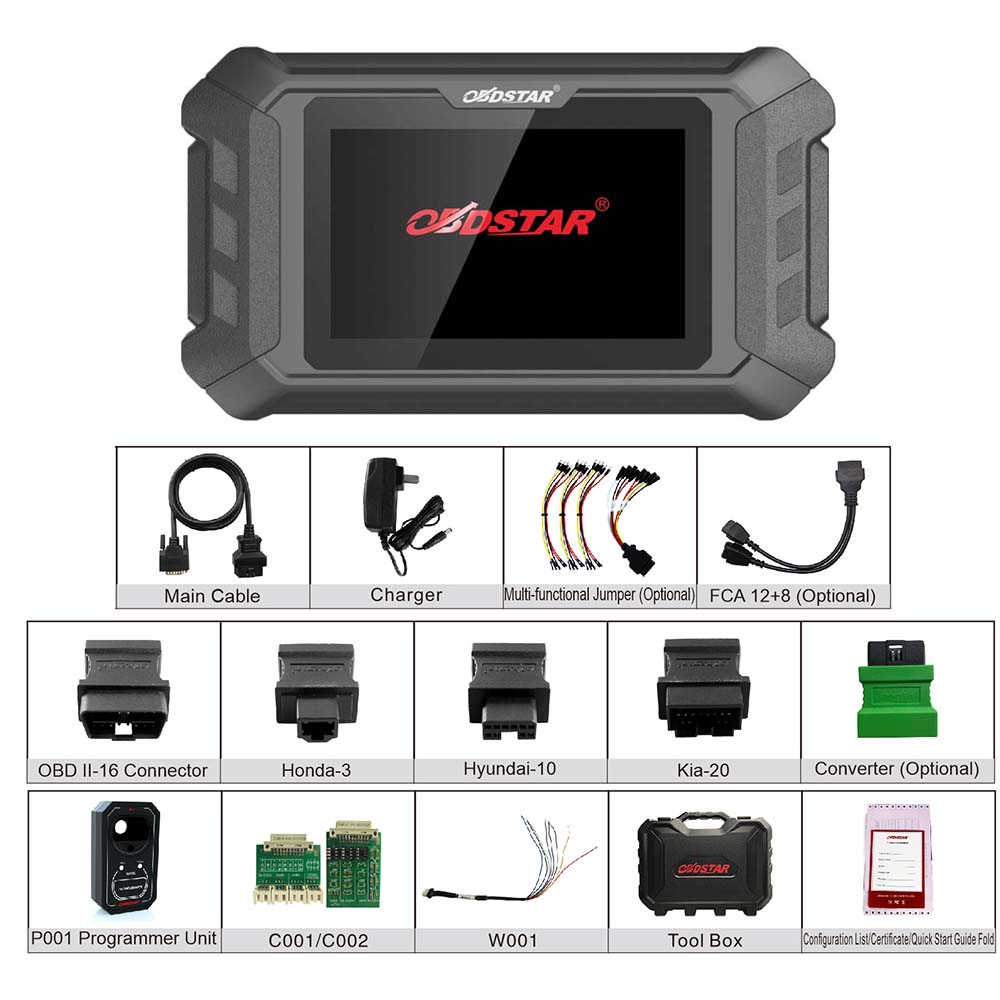
OBDSTAR X300 Pro4 is an all-purpose immobiliser programming device meticulously designed by OBDSTAR for locksmith. The device inherits the automobile immobiliser programming technology from OBDSTAR with a lot of advantages of early start, wide model coverage, fast programming speed and special features All-in-one machine structure, more convenient to use full optimization hardware, running more stable, faster and smoother.
OBDSTAR X300 Pro 4 Programmer Function List:
Programming Keys
Erase Keys
Programming Remote
Read Key Numbers
Pincode Reading
EEPROM Chip Read
OBDII Diagnosis
OBDSTAR X300 Pro 4 Programmer Support Car Models List:
Europe:
for BMW, for BENZ, for BORGWARD, for PEUGEOT/CITROEN/DS, for DACIA, for FIAT, for JAGUAR, for LANCIA, for LANDROVER, for OPEL , for RENAULT, for SMART
VOLVO, for IVECO, for VW/AUDI/SKODA/SEAT
America:
for FORD, for CHRYSLER, for GM
China:
for BAIC, for BESTURN, for BISU, for BRILLIANCE, for BYD, for CHANGAN, for CHANGHE, for CHERY, for COWIN, for DFFENGSHEN, for DFFG, for DFLIUZHOU, for ENRANGER, for FOTON,GEELY, for GREATWALL, for HAFEI, for HANTENG, for HAWTAI, for HIMIKO, for ZZNISSAN, for HNMAZDA, for HONGQI, for HUANGHAI, for JAC, for JIABAO, for JMC, for LIFAN, for LUFENG,LUXGEN, for MAXUS, for QNLOTUS, for QOROS, for ROEWE, for SGMW, for SWM, for SOUEAST, for TJFAW, for TRAUM, for TRUMPCHI, for XENIA, for YEMA, for ZD, for ZHONGXING, for ZOTYE ZZMAZDA, for CHANGFENG
Japan:
for HONDA, for ISUZU, for MAZDA, for MITSUBISHI, for NISSAN, for SUBARU, for SUZUKI, for TOYOTA/LEXUS
Korea
for HYUNDAI, for KIA, for SANGYONG
Note:It can not support for Lamborghini/Maserati/Ferrari/Bentley/Alfa Romeo/Abarth
Contrast:
OBDSTAR X300 Pro 4 Programmer Specifications:
1.Operation system: Android 5.1.1
2.CPU: RK3128 Quad-Core ARM Cortex A7 1.2GHz
3.Battery: 2600mA, rechargeable polymer lithium battery
4.Extension memory card: 32G Micro SD (TF) card supported
5.Memory capacity:16GB
6.Storage capacity: 32GB
7.LCD: 5.0 inch
8.LCD resolution: 8000*600
9.Touch screen: Capacitive touch screen
10.Camera: 5 mega rear view camera
11.Wi-Fi: supported
12.Working temperature: -20℃ ~ 55℃(14℉ ~ 131℉ )
13.Storage temperature: -20℃ ~ 70℃(-4℉ ~ 158℉ )
14.Weight: about 700g
Dimension: 140mm*89*mm*18mm
Package includes:
1pc x X300 Pro 4 Unit
1pc x Main cable
1pc x Charger
1pc x Multifunctional Jumper( Optional)
1pc x FCA 12+8 (Optional)
1pc x OBDII-16
1pc x for HYUNDA-10
1pc x for KIA-20
1pc x for HONDA-3
1pc x CONVERTER( Optional)
1pc x P001 programmer
1pc x C001 board
1pc x C002 board
1pc x W001
1pc x Tool Box
1pc x OBDSTAR Certificate
1pc x X300 Pro 4 fast guide manual
1pc x packing list
Sunday, November 3, 2019
Reviews of VXDIAG SUBARU SSM-III Multi Diagnostic Tool
Category : Vxdiag
1.All System Diagnosis. Selecting this item displays on a single screen the fault detect status of all control system control modules for which SSMΙΙΙ diagnosis is supported, and memorized diagnostic codes.
2.Each System Check. Selecting this item makes it possible to select a particular system from among the control systems forwhich SSMΙΙΙ diagnosis is supported, and perform fault diagnosis.
This item can be used to view input/output data of the system control modules that perform fault diagnosis, memorized diagnostic codes, and other data on the PC display. This menu item is also used after repair work is complete to delete diagnostic codes, to configure control module settings, etc.
3.Saved Data Display. This item can be used to save various data sampled during fault diagnosis operations, and to load data for viewing after work is complete.
4.Immobilizer. This item performs immobilizer registration.
5.Reprogram. This item performs reprogramming of the control module.
6.Read CF application measurement data. This item performs reading stand alone measurement data saved in a CF card to hard disk of your PC.
7.Convert/Save measurement data on driving recorder. Loads data sampled on the driving recorder to the PC from the CF card, and converts and saves that data.
8.Oscilloscope. After attaching the optional pulse/analog cartridge to SDI, connect the pulse/analog box to the SDI and using pulse/analog probe to perform analog sampling.
9.Program Subaru smart key
Reviews of Vxdiag Subaru SSM-III:
I have a Vxdiag Subaru and find it useful as it will talk to everything on the car, including immobilizer systems. . . it emulates the Vxdiag Subaru SSM iii and uses cracked SSM software (which is why it’s such a pain to set up). It is *extremely* picky about OS. I wound up having to buy a new(ish) laptop running win7 to get it going. Wouldn’t work with XP or 10.
The error code is due to the lack of the CF card. It’s benign.
But my mission is a bit different from most. I make and program keys for a living and for a while the SSM was the only thing that would program the prox fobs. Not true anymore but I still paid less for the VXdiag with software than I would for a single piece of software for my T-code pro. . and there are 3 for Subaru. I have one which only covers the earliest models.
I also find it handy for doing stuff like turning off the passenger seat belt warning (my dog rides over there sometimes and doesn’t like wearing his belt) or setting the wiper de-icer to work for as long as I tell it to instead of a 12 minute cycle. Or make the door locks unlock with one press of the remote. All of this is stuff you won’t be able to do (AFAIK) with any other scanner.
I also rebuild wrecks and it’s the only thing that will talk to the airbag systems so I can figure out WTF is making the light stay on after cobbling together a car from 2 or 3 others.
You could pay the $3k for a legit SSM3 plus another $2k/year for software and have no problems with install. . .
But if all you want to do is check/clear codes and view live engine data occasionally, yeah, you don’t need this.
Btw. You have to have a NASTF LSID or be very good friends with a Subaru parts manager.
You need an immobilizer code (which is VIN specific) to program keys/fobs. It does not change so once you have it for your car you can go nuts. Odds are your dealer would probably give you YOUR immobilizer code if you shop there somewhat regularly. They may charge you for it as I know they have to pay a couple of bucks to mama subie for them.
There’s also an ‘enabling password’ which is also static and I suppose is a very flimsy extra layer of security to protect the immobilizer features of the SSM. It’s 3781.
Subscribe to:
Posts (Atom)